
Pages - with buttons

About me-contact me Disclosure

Wednesday, December 10, 2014

The Old with the New

With PARCC looming around the corner, it seems like we are being asked to do more with less. How are we supposed to prepare our students for the complicated technology tasks they will be asked to complete without the proper equipment? This post is about my attempts to prepare my students for a high tech test with limited resources.


Recently, I have become obsessed with an app called Good Reader. The name of this app doesn't lie, the app really does help your students become good readers! I have been using this app to familiarize my students with several components of digital reading.

  1. How to read using a screen
  2. How to zoom in/out
  3. How to turn the pages
  4. How to read articles (columns, directionality, etc.)
  5. How to mark up the text digitally


I started by selecting a text from EBSCOhost. I added the text to my Dropbox. Then, I had students open the file on an iPad in Good Reader. Students read the text carefully, and we discussed the text. Students were able to use the "post-it" feature to record the definitions of new vocabulary words. We previewed the words and recorded the definitions in the app. Then, students were able to access these notes as they read.


With this first text, I wanted to focus primarily on written response. The acronym my district uses is RACE.

Restate the question
Answer the question
Cite the text             
Edit your answer     

I wanted to start with the very basics. While all of this new technology is awesome, we also need to remember the basics. Rome was not built in a day. I wanted to take my students to the very beginning of written response. We are building from the ground up.


I began by having students record the question in their reader's notebooks. (Yes, in the future I hope to do all of this on computers, but...baby steps!) Then, my students went back into the text and used Good Reader to highlight or underline where the answer was found. Next, we began constructing our response using the RACE method.


Students then went back into the text and also highlighted/underlined evidence from the text to support their answer. When finished, students had to proofread their answer. All in all, this one question took a very long time. To me it was worth it. Quality over quantity in my book. Slowly, we will continue to transition the whole process to the computer. While I don't have a lot of fancy equipment, one little app on the iPad made a world of difference.

How do you prepare students for PARCC's written response?


Monday, December 1, 2014

Currently December!

It's hard to believe that it is already December! That could be because it is 60 degrees outside... I put up my Christmas decorations and started listening to my Christmas playlists, though. These last three and half weeks before Christmas are going to be fast and furious! The start of a new month also means time for Farley's Currently!


Listening
The holiday season means Hallmark movies to me. Some of them are surprisingly good, and some of them are surprisingly bad. I watch them all, though. The good, the bad, and the downright ugly. It's my guilty pleasure!

Loving
I went back to my hometown for the Thanksgiving holiday. While I was there, I found a wedding dress! I love it! It is very light and flowy. My mom described it as sort of Grecian.

Thinking
I am pretty sure I will get observed again before Christmas. With four observations a year, they really have to crank them out. My last one was in September, so I know it will happen any day now! I always play these up more in my mind. They are never as big of a deal as I expect.

Wanting
I do not love the cold. I like snow. Not cold. While I know 60 degrees in December is completely unnatural, I still loved it today.

Needing
There are a lot of decisions to make when wedding planning. I have picked my colors - golden yellow and slate gray. I have a pretty good idea what I want for bridesmaid dresses, I just want to go check them out in person first. I am trying not to pick something too expensive, but there are not a lot of good, inexpensive choices!

Giving
To be festive, I am giving my Snowman Summary Graphic Organizer. Summaries are more fun with a snowman, right?!


I can't wait to see what everyone else is up to!


Saturday, November 8, 2014

iPad Apps for Reading!

This week I gave a presentation on iPad apps at my district. It was a great experience, but very nerve-wracking! Now, I am more than happy to share the apps I use with all of you!

Here is a link to the prezi if you would like to see the entire presentation!


This app is my favorite. It allows students to mark up the text in a variety of ways. Some ways that I use the app include having students tag notes for vocabulary definitions, use the online dictionary feature, highlight important parts or evidence for questions, and underlining. The possibilities are endless, really. This app works very well with Dropbox. I place articles in my school Dropbox account, and then students are able to access the texts. Then, students save an annotated copy of the text back into the Dropbox account so that I can review student work. I honestly cannot say enough things about how awesome this app is.


I've mentioned this app before. It really simplifies running records. You don't need to prepare copies in advance. You can even take a picture of the text to keep track of the words as students are reading. There is also an option to record the student's voice as they are reading. Most of the scoring calculations are done for you as well. Then, you can send the record to your email or other storage system.


This is a great app if you like reader's theater. With this one, students can read scripts you have prepared for them, or students can write their own scripts and upload them into the app. Then, students can record themselves reading the scripts and submit the recording to the teacher. This app requires you to have Dropbox for the scripts and the recordings. The scripts also must be saved as .txt files, but that can be done in Microsoft Word.


I really love this app for reviewing various phonics skills. Students can practice different phonics patterns with flashcards or in a game format. The app can be customized many different ways. You can have audio with the flashcards for teaching, audio only clicking on the word, or no audio. For students with phonics gaps in my intervention groups, this is a life saver.


This is just a simple recording app. I use this app to have students self-assess their oral reading. They record themselves reading and then use a rubric to assess themselves. I later assess the students on the same recording, and together we discuss areas of strength and weakness.


This is just a great app for transferring files between your laptop or desktop and the iPad. I tried Google Drive and One Drive, which are good, but more apps seem to be designed around Dropbox. I have found it much more useful than the other cloud storage apps.

What are some of your favorite apps for reading instruction?

Sunday, November 2, 2014

November Currently!

November is officially here! What a wonderful month! Thanksgiving, time to spend with family, daylights saving time (some plus, some minus there...), and a whole lot of food! It's also time to link up with Farley's Currently!


Listening
I just decided this morning to start watching Gilmore Girls over from the beginning on Netflix. I have  a feeling that this is going to destroy any chance of productivity. It is such a great show, though!

Loving
Because of the teacher's convention in NJ, I have Thursday and Friday off this week. We have professional development the other three days, though. That is a lot of learning for one week!

Thinking
I am going on a nice, scenic hike in Pennsylvania today. Right now I am looking out the window. The trees are blowing like crazy. I hope I don't blow away down the trail! We are hoping to catch some nice views of the fall leaves. The Internet claims this is the best time. 

Wanting
I am actually leading one of the professional development sessions this week. I am really nervous! I have never lead professional development on my own before! My session is about some iPad apps. I will post more in depth later this week. 

Needing
Is it really possible to have enough coffee on the weekends? I am enjoying as much pumpkin spice coffee as possible before it is no longer festive! The stores and commercials have already switched to Christmas! TOO EARLY.

Reading
I can't believe my marathon is only 21 short days away! In preparation, I am reading Once Upon a Runner. The character is definitely a little more intense about running than me, but it is interesting to get into the mindset of competitive runners.

What is everyone else up to?


Friday, October 24, 2014

Quit Sounding Out!


I don't know about your students, but my little first graders are addicted to sounding out. Fundations is a beautiful thing, but it can become very tedious when students try to "tap out" every single word in the book. I am working very hard to get my students to use other word attack strategies. I made the anchor chart above to help remind my first graders of their strategies. The pictures and colors help all my students, but especially my ELL students.

1. Look at the picture
2. What would make sense?
3. Look at the beginning letter.
4. Skip it, and then go back.
5. Look for chunks you know.

It usually isn't too difficult to get students to use the picture and the beginning letter. Occasionally students forget to match the beginning letter with the picture. We do a lot of activities match new vocabulary words to pictures on the SMARTboard to practice thinking about the beginning letter. The more advanced the books become, the better able students are able to use chunks. The words in the C-D level books are not really made up of too many parts. We do start to think about digraphs, though.

I find the most powerful strategies to be skipping then going back and thinking what makes sense. These are often the most difficult to get students to use. Students are often reluctant to skip words, thinking they aren't "allowed to do that." Once they finally get the hang of it, this is often students' favorite strategy. 


To get students to understand how to use these strategies, we do plenty of guided reading with lots of time spent whisper reading. Most importantly, I explicitly model how I think aloud when I problem solve during reading. With each book, I will pretend I don't know a word. Then, we will use our anchor chart to select strategies for me to try. During this modeling, I love using the document camera and SMARTboard.


I am sure plenty of you are familiar with Reading A-Z. They have awesome projectable books for the SMARTboard. You can use a variety of tools to markup the text right there on the board for students. This is also a powerful way preview vocabulary during picture walks. Again, giving students the chance to work on matching beginning letters with what makes sense.


If you would like a copy of the anchor chart, please click the link here. It works well printed as an anchor chart or displayed on a SMARTboard. Enjoy!

What are your students favorite word attack strategies?


Saturday, October 11, 2014

The Power of Interactive Writing!

These past couple of weeks I have been incorporating an often neglected strategy into my intervention groups...interactive writing! In interactive writing, the teacher shares the pen with the students, and they compose the text together. Students are involved in the process of deciding what to write, how to write it, and the actual writing of the piece.


The video above is a great example of an interactive writing lesson. It was produced by the New Jersey Department of Education. The teacher does a wonderful job of sharing the pen with the students. Through this process, she is really able to reinforce a variety of phonics concepts as well as concepts of print.

I was inspired to incorporate more interactive writing into my intervention groups.


My kindergarten students composed a message about Fall. It was in response to a poem we read through shared reading. This message was actually written by all three of my groups. Each group decided what they wanted to contribute. The title was added by the last group. My first group is the lowest. They wrote the first two sentences. You can see that we wrote the words together. They often made the first letter or last letter, since those are skills we are working on. Then, my other groups attempted to write entire words by themselves. This was our first piece, and we still have some work to do. The students were extremely excited about getting a chance to write. They were all desperate for a turn!


I also tried interactive writing with my third graders. I used a laminated piece of chart paper so that it was easy to correct our mistakes We wrote a nonfiction summary together. I wrote the main idea, and they wrote the supporting details. While we were focusing on the skill of summarizing, this also provided a great opportunity to review phonics skills, capitals, and punctuation. I was surprised how many times they forgot their capitals and periods! 

I was also surprised how excited they were to be participating in the actual writing. I know many teachers feel this takes up too much time with the older students, but I believe it was a valuable experience. While one student was writing, the other students were writing in their reader's notebooks. There was never any down time. Students were always engaged. They also couldn't wait to get their hands on that dry erase marker! They kept commenting on how they were "playing teacher." While it took more time than just writing students' ideas myself, the payoff was well worth it!

How do you incorporate interactive writing into your teaching?


Thursday, October 2, 2014

October Currently!

October is here! One of my absolute favorite months of the year! I love the fall colors and all of the delicious fall treats!


A new month means time to link up with Farley's Currently!


Listening
It might not be the most excited thing, but I always start the morning with the local news. Around these crowded parts, it is always good to check out the traffic before the morning commute!

Loving
My first observation is already over! Since I had spent most of September testing, I only had one week of teaching my new students under my belt before I got observed. It was kindergarten, too! I think everything went well and I am glad to have it done. Today is my post conference. Fingers crossed!

Thinking
Can you keep a secret? The other reading specialist and I are going to dress up as Echo the Owl from Fundations for Halloween. It is going to AWESOME, but we want it to be a surprise. Now, we just have to actually get it together...

Wanting
One of the tough parts of being a reading specialist is all of the unknown and the lack of control. My schedule changes each year. We are still trying to finish up my schedule, even though I have started teaching already in some rooms!

Needing
I really need to get moving on putting up my fall decorations. I love all of the fun decorations for this time of year. I just have to make sure I don't go overboard. You might say I have a bit of an obsession with fall...

Treat!
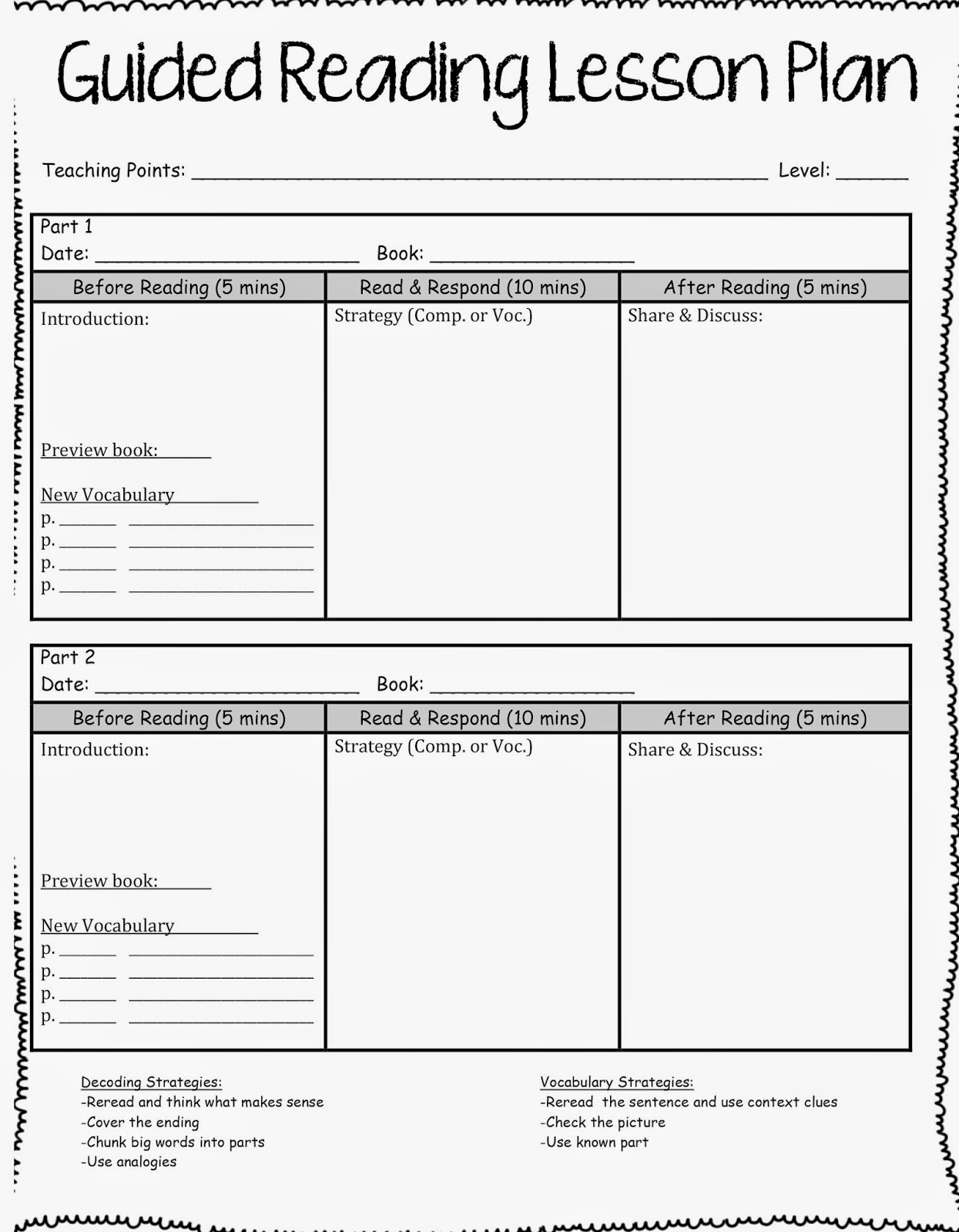
I just finished tweaking the lesson plan template for my upper elementary guided reading groups. It is a fillable pdf. I hope you find it useful!


Can't wait to see what everyone else is up to!


Related Posts Plugin for WordPress, Blogger...
Pin It button on image hover